AI Part 6: LLM and Agent Security

Prior to the '90s, the world's telephone network ran on a collection of systems which implemented some variant of a protocol called MF Signaling (MF), as well as a formal version called System Signaling No. 5 (SS5).
The system was controlled by a series of tones. If you played those tones into a phone handset, you could obtain a certain measure of control over the phone network. Most notably, this was widely abused to make free long-distance calls.
This worked because of the fundamental design of the network. In the old days, you picked up the phone, a human operator answered, you told them who you wanted to call, and finally they plugged a physical cable into a switchboard which effectively created one long wire between you and the person you were calling.
That idea of basically creating very long wires from individual segments was called circuit switching.
MF was designed to automate away the human operators, but a caller still needed a way to tell the automated network who they wanted to call. In the early days that was rotary dialing, but crucially the only way to send those signals was on the same pair of wires that were used to conduct the call. This is known as in-band signaling. At that time, the design was unavoidable.
The problem for the phone network is that it is impossible in such a system to know who is sending a tone. There is no way to differentiate if a tone was being introduced by the system, a legitimate operator, or a phreaker, as abusers of the system were known. They used a small device to create the necessary tones which was called a "blue box".
As a brief aside, a famous phreaker, "Captain Crunch", was so named because he found a whistle in a box of Cap'n Crunch cereal which just happened to perfectly produce the "trunk seizure" tone. Steve Wozniak and Steve Jobs were friends of Captain Crunch and built blue boxes for sale before starting Apple; a venture they abandoned after being robbed at gunpoint.
After the technique was published in 1971 by Esquire Magazine, the abuse exploded and was exploited by both individuals and sketchy services offering very low cost long-distance calls.
Eventually this problem became so bad that the carriers did what the phreakers thought was impossible: they replaced everything in the network with Signaling System No. 7 (SS7).
SS7 solved the problem in the only way that was possible: creating an entirely parallel set of wires that carried the command signals such that the system was immune to tones being played in the audio stream. This is known as out-of-band signaling. An expensive solution to be sure, but ultimately the only one that could conclusively deal with the problem.
Why LLMs are vulnerable like SS5
So why am I explaining all this in a post about LLM security? LLMs suffer from the same basic problem of in-band signaling.
I mentioned this briefly in a previous essay about how LLMs work. An LLM cannot reliably tell the difference between what its owner told it (the system prompt), what you told it, what it said itself, or data retrieved from external sources on your behalf, such as potentially malicious web pages.
Bruce Schneier recently led the production of a new paper, "The Promptware Kill Chain", which illustrates just how extensive the problem is and provided a model and nomenclature for to how to think about the threat.
In it, he references over 30 real world attacks and proofs of concept that leverage the in-band signaling problem. One in particular, goes like this:
- Attacker sends a calendar invite with a malicious prompt (instructions for the LLM in plain language) stored in the title
- It establishes itself in the long term memory of the LLM. Even if you start a new conversation, the problem is still there (known as persistence)
- It establishes an ongoing communication channel so the attacker can provide updated instructions from time-to-time (known as C2 or Command and Control)
- It launches Zoom and joins a meeting so the camera and audio feed of your system is sent to the attacker
- It is instructed not to mention any of this to you
So, thanks to AI agents running on your local system, your computer turns into a surveillance device and all you had to do was ask about your appointments next week.
There is nothing stopping the attacker from including instructions to download and execute traditional malicious payloads which can do anything from stealing your passwords to installing ransomware. Such payloads can be very sophisticated.
This is rather more difficult to solve than MF/SS5 however. In those cases, the comprehensive solutions were fairly obvious, if breathtakingly expensive to implement. There is a clear delineation between signals and audio; they can be easily separated. MF/SS5 also had the benefit of being deterministic systems. They always worked the same way.
In the case of LLMs, data and commands are not easily distinguishable from each other, nor are the sources. There is no clear path to create a true out-of-band signaling equivalent for LLMs. It arguably requires a significant leap forward from the state of the art. Even then, they are probabilistic. They don't always work the same way so solutions produced for them are necessarily unreliable.
So we are left with an incomplete patchwork of solutions, each of which is vulnerable to being bypassed. This is common in systems where security has been added on after the fact or where it is not possible to implement security from the outset, and we are left relatively weak solutions such as sandboxes that can be bypassed.
This is especially problematic in non-English contexts as most of the imperfect defenses that have been implemented, have only been done so in English. The attacker can choose to speak to your LLM in a language of their choice.
AI Agents
Much of the rest of this article will be about AI Agents, but that term might be a bit nebulous to some readers, so I feel I should help clarify that.
The term "agent" is taken directly from how it is used in contexts such as real-estate agent, travel agent, insurance agent, or talent agent: a person legally empowered to act on behalf of another person or entity.
We can view AI agents as informal agents, lacking the laws and regulation that often accompany the traditional kind, not that an AI is currently capable of things such as duty of care, duty of obedience, duty of transparency or liability anyway.
Technically, an AI agent is a piece of traditional software that connects an AI, such as Claude or Gemini, to real-world resources.
If you want Claude to sort your email for you, you must give it access to that e-mail. If you want it to buy something for you, it needs a credit card, a browser and access to eCommerce storefronts. If you want it to help you fix your computer, it needs all-powerful access to it and everything on it.
More broadly, AI agent refers to the combination of the AI, the agent software, and the resources it has been empowered with.
Don't be there
Returning to security, I think we can take some inspiration from a concept from military circles, the so-called survivability onion:
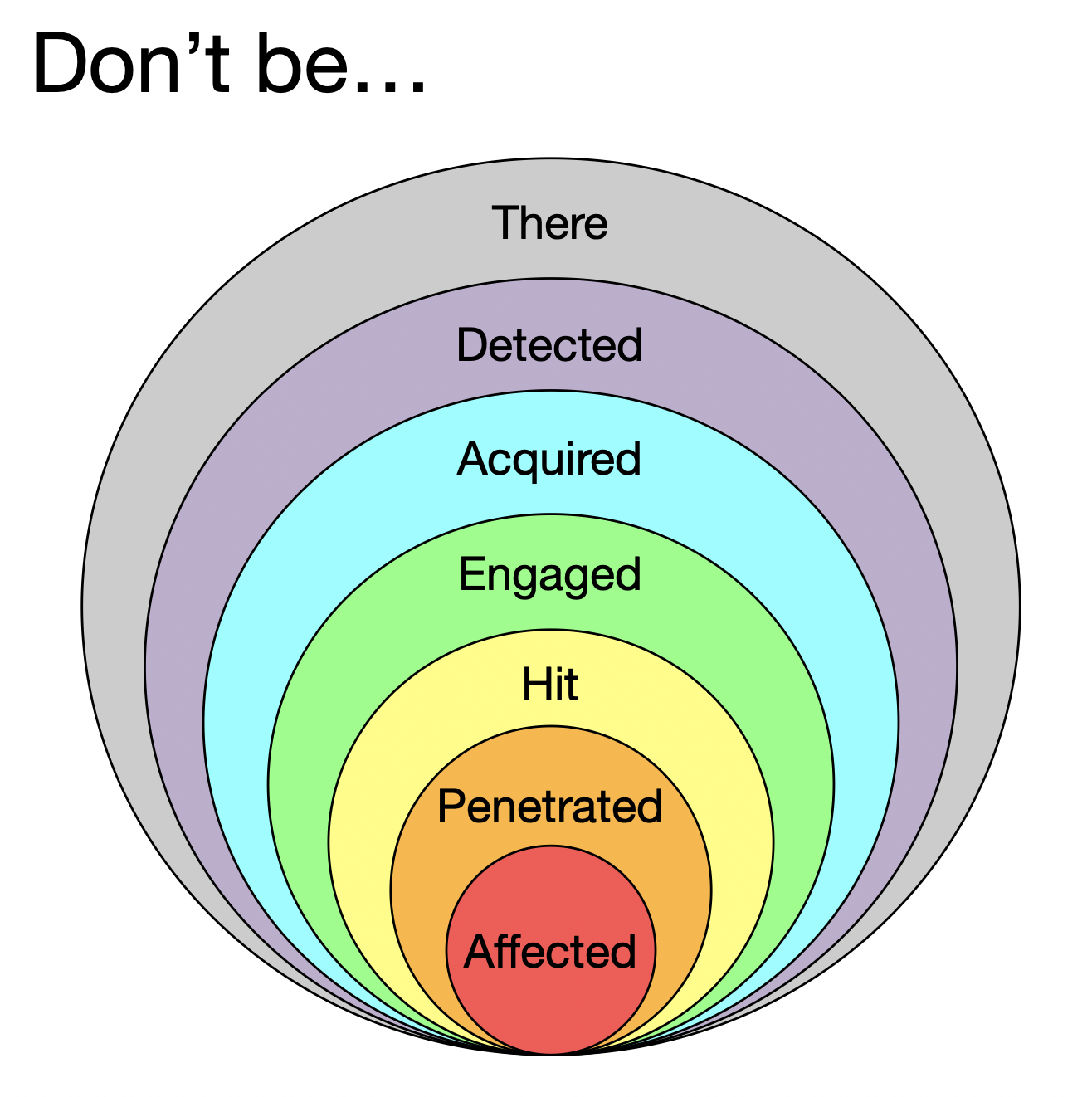
Despite the funny name, this is a useful model that is adaptable to many security contexts. We can think about eliminating or mitigating threat at each layer.
"Don't be there" is clearly the best option. My advice is to not use any form of AI Agent at this point. In IT, we call brand new technology the "bleeding-edge" for a reason. Let someone else get cut first.
No need to take my advice on it. One of the programmers of the world's most popular AI agent, OpenClaw, says:
"If you can't understand how to run a command line, this is far too dangerous of a project for you to use safely".
Please take his words to heart, and even if you can use a command line, I'd still skip it. Most technicians are not qualified to handle the security implications properly, which arguably includes its creators.
Even separated from AI, OpenClaw has major issues. An informal security audit in late-January 2026 indicated they found 512 vulnerabilities, 8 of which were rated as critical. Unsurprisingly, much of the agent is vibe coded (code rapidly written by AI that has seen little or no validation; more on that in another post).
Cisco called it "a security nightmare" and Gary Marcus, one of the big names in AI research, called it "a disaster waiting to happen".
One security company sent a vulnerability report to the OpenClaw team. Its founder responded:
"This is a tech preview. A hobby. If you wanna help, send a PR. Once it’s production ready or commercial, happy to look into vulnerabilities".
A "PR", or "pull request", is a contribution of computer code; he's basically saying, "fix it yourself".
His point is not entirely without merit. He wasn't getting paid to do this and it's just that to him, a hobby.
Still, I'm inclined to think he has some kind of responsibility to the millions of people downloading his code and entrusting their systems to his software. Many other volunteer open source projects take their duty of care seriously, not to mention their craftsmanship.
Many of the downloadable third-party plug-ins that are available for OpenClaw are malicious; they are basically computer viruses delivered as a helpful plugin. It's a problem that I only expect to get worse.
I am focused on OpenClaw because it is far and away the most popular AI agent at the time of writing and the one a reader or someone they know is likely to be exposed to. That said, wide swaths of the AI ecosystem are like this.
A recent example of the dangers of agents such as OpenClaw is when Meta's chief of AI Alignment (making sure the models are working in our interests) asked to have a plan drawn up for cleaning her e-mail, and the system simply started deleting it all, despite her repeated commands to stop.
Running Agents Safely
I use Claude Code periodically. Until recently I've been throwing away the code it produces due to poor quality, but as of Claude 4.6, I've found the output to be sufficient, at least for simple projects (more on that in an upcoming post).
When I run it, I take the following security measures:
- Isolated network with no direct access to the internet or internal systems
- Access to a restricted set of sites is provided by another computer that makes internet requests on Claude's behalf
- A single computer exists in the network and that only runs Claude Code
- The only files on the computer are the minimal files necessary to accomplish the task at hand
- Claude Code runs under it's own user with access limited only to the working directory
- Claude Code itself is run by another program which strips away unnecessary privileges and creates special folders such that Code cannot indirectly or accidentally interact with other parts of the system
- I personally review every line of the code it produces
This is not a list of precautions that most users can reasonably replicate.
Thankfully, Anthropic has done an excellent job of implementing most of those same controls in their Claude Desktop app, insofar as it is possible to do so on a single system. That covers both Claude Code and Claude Cowork. Their safety docs are worth a look as well.
On the Mac, Claude Desktop creates a very small virtual computer, called a VM, that uses Apple's custom silicon to enforce a boundary between your real computer and the VM. Windows has something similar but, in my opinion, less fit to purpose.
Inside that virtual computer there is a small, special purpose system based on a technology called Ubuntu Linux, which is common in technical circles and what I used in my own case.
That system enforces a similar set of access and privilege-stripping controls to the ones I made and Claude Desktop itself does its best to limit access to the filesystem and network.
It's a thoughtful piece of engineering and I am sure as I look more into it, and the recent source code leak, I'll find more to like. These engineering decisions ultimately arise from the personalities of the company's leadership and the corporate culture that flows from that, so I expect a certain consistency on this front.
I can't stress enough how rare this level of thought and care is with regards to security. My opinion of the vast majority of software is not high, so this is a breath of fresh air.
Keep in mind that when you allow access to a directory on your computer or to a site on the internet, you are, in effect, bypassing all the security protections. So exercise the principle of least privilege and don't give it access to your whole system or the whole internet.
Create a directory just for Desktop and only let Claude work in that directory. Move your files in an out as needed. If a file seems suspicious, don't open it or move it out of the folder. Just delete it.
Securing the network is not easy. The most dangerous piece of software on your computer is, by a huge margin, your browser, followed by your e-mail client. Claude Desktop denies everything by default, which is good practice, and asks you to allow each site, creating a kind of whitelist.
The problem is that this becomes very unwieldy very quickly and users will be tempted to press some permutation of an "allow all" button. Various parties maintain lists of unsafe areas of the internet. Anthropic should include these lists, update them frequently, and always deny access to anything contained within. My network controls do just that, but Claude Desktop does not include such a system as yet.
Think very, very hard about letting it have access to your real e-mail. Your e-mail is a prime target for attackers because it is the gateway to every account you own. Once an attacker gets in, they get a map of all your accounts and the means to reset those passwords. It's the master key of your online life.
The best idea is to give Claude it's own account and use that for your joint work. Keep in mind this comes with it's own set of tradeoffs. Gmail is built-in by default, so we can trust the security of it, but Google is antithetical to privacy.
To access other e-mail systems, you can use a third-party Model Context Protocol (MCP) provider. MCP is a way of making services available to AIs and not people or traditional software.
However, then you have to trust that the MCP company is very secure and not malicious. This is not always easy to figure out, particularly in a young market that is the target of hackers.
If you follow all the advice, can you still have major problems? Yes. There is no such thing as security; only risk management. You can eliminate, mitigate, transfer and accept risk.
What I have offered are some basic, common-sense steps to mitigate the risk. You need to think hard about what you can do to eliminate or mitigate risk yourself and then consciously decide to accept the remainder, come what may.